Powerful note‑taking, without the hassle.
A free, open-source alternative to Notion, Obsidian, Evernote or OneNote. Your notes stay yours, whether you run it yourself or let a host run it for you.
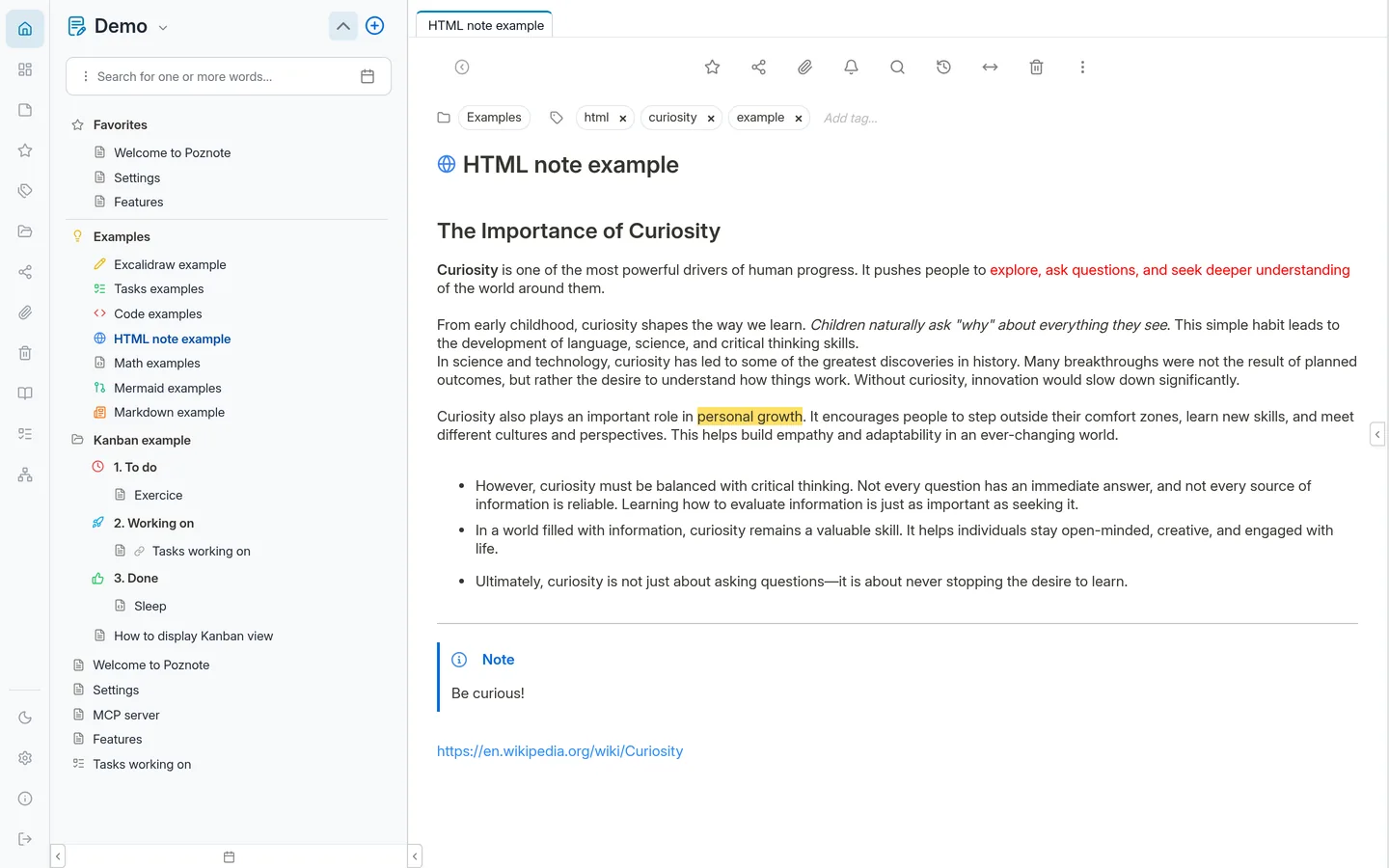
Here is what Poznote looks like.
Seven views of the same app: the note editor, the Kanban board, the tasks page, the dashboard, Markdown notes, the graph and the diary. Click a tab to switch, or open the live demo to try them yourself.
A clean rich-text editor with folders, tags, favorites, and an outline panel to navigate long notes.
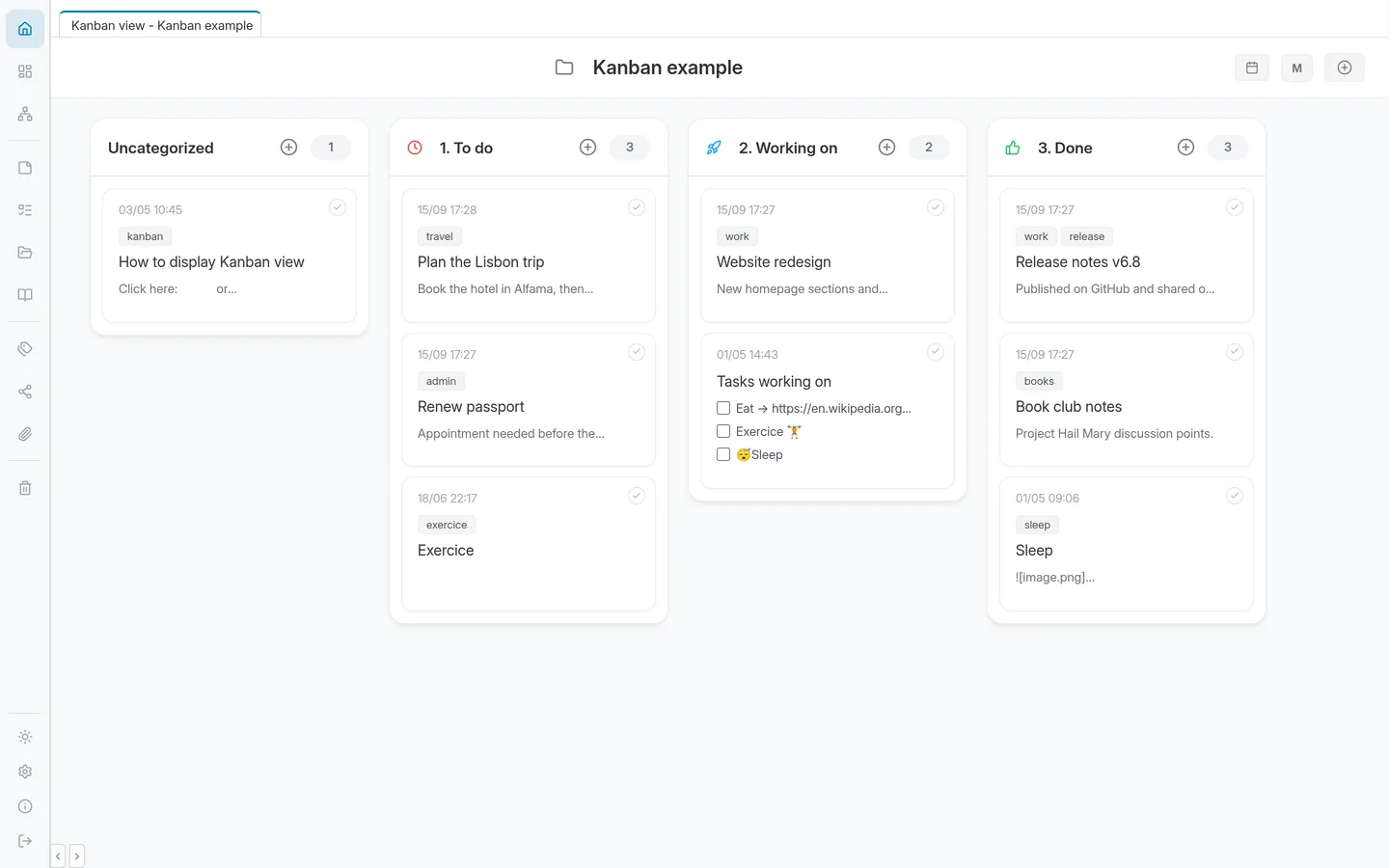
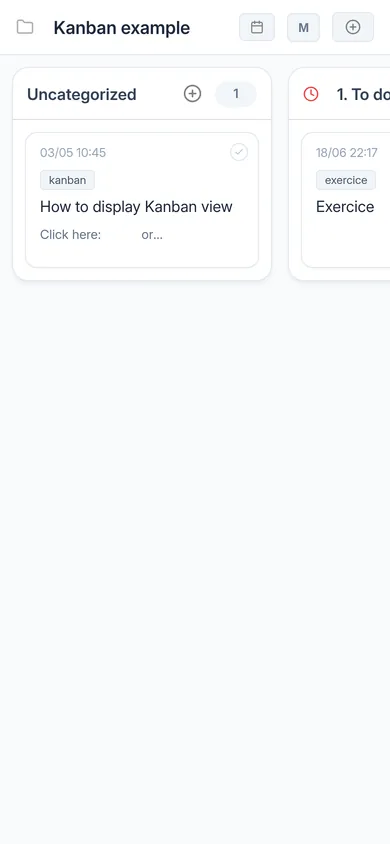
Any folder becomes a board. Each subfolder is a column, each note a card you can drag around, without leaving your notes.
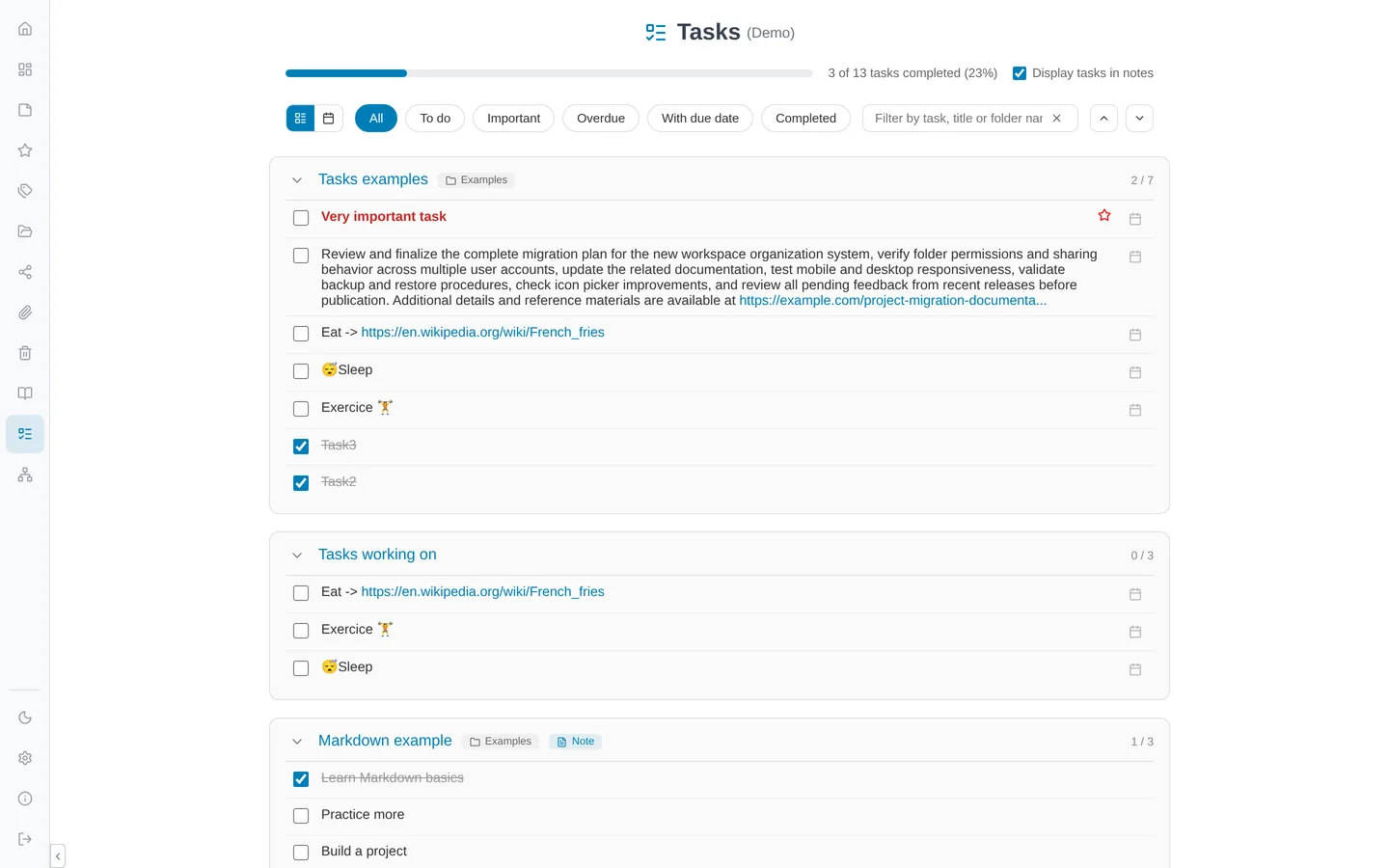
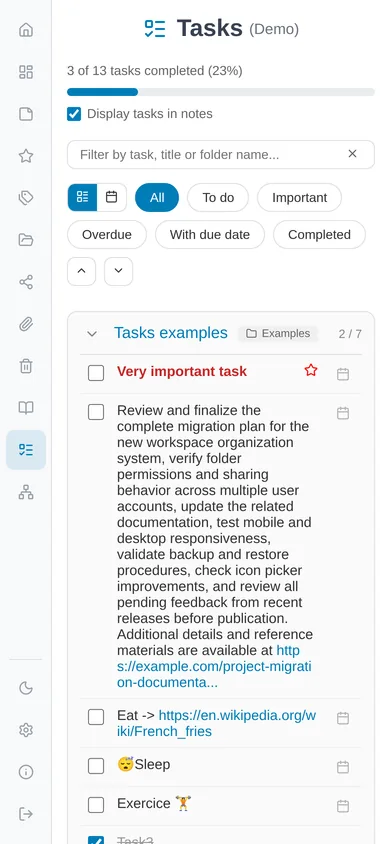
Every task from every note, in one list. Filter by status, due date or importance, or switch to the monthly calendar.
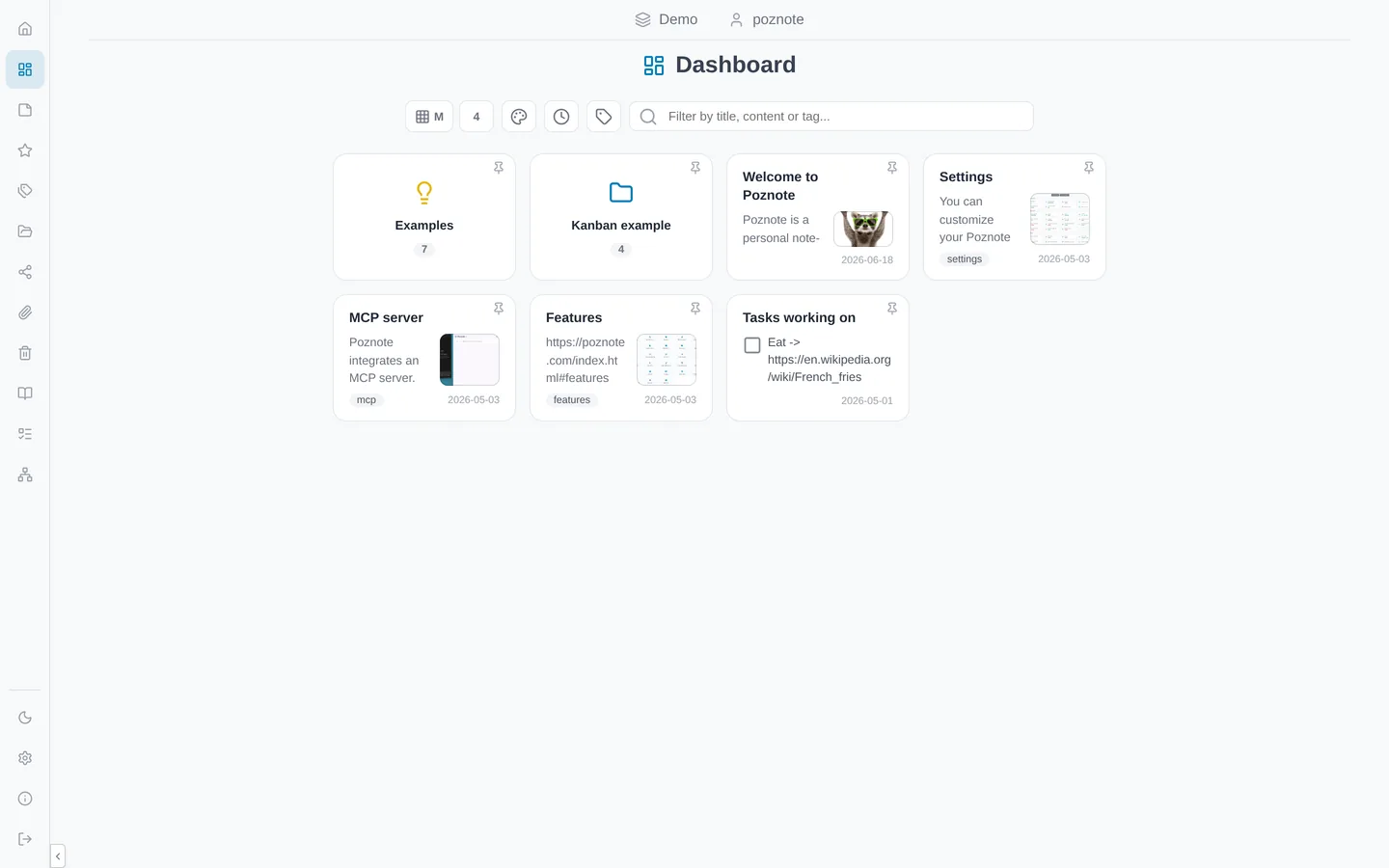
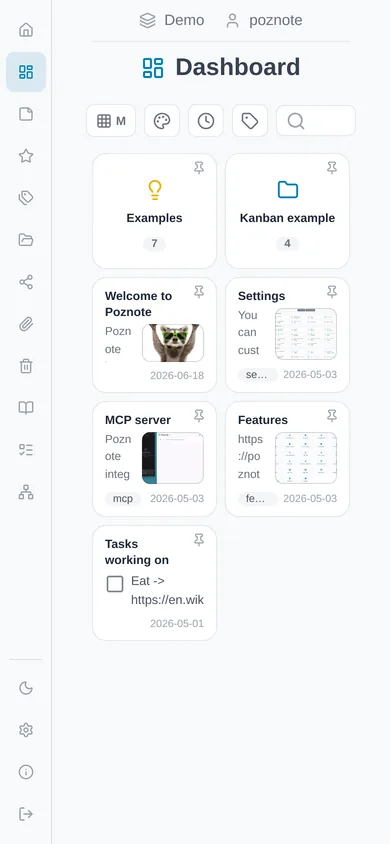
Your workspace at a glance. Folders, latest notes and pins, with instant filtering by title, content or tag.
Write in Markdown with a rendered preview and an outline of your headings. The note is a plain .md file on disk.
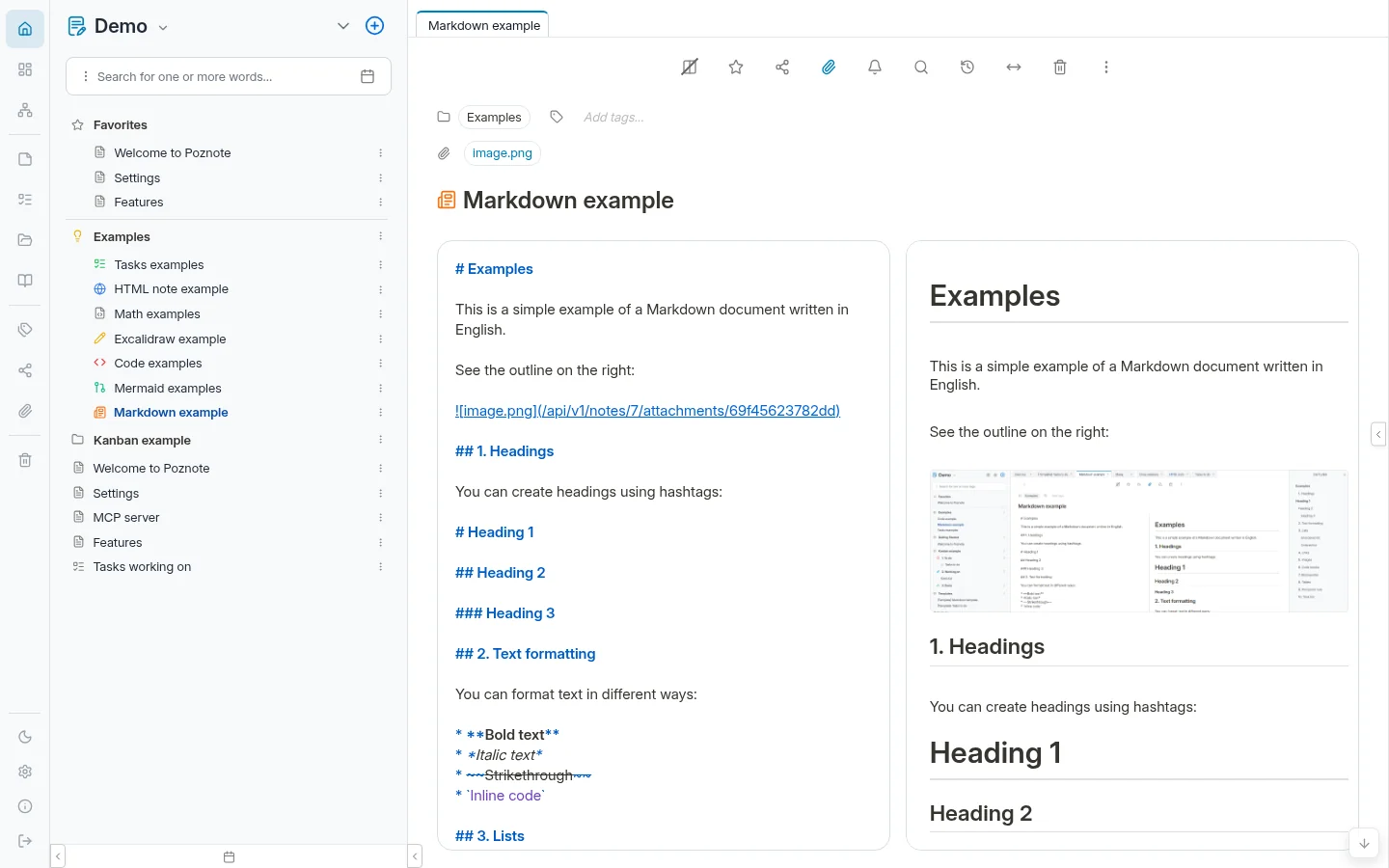
Explore the links between your notes, filter by folder, and rearrange the layout as you like.
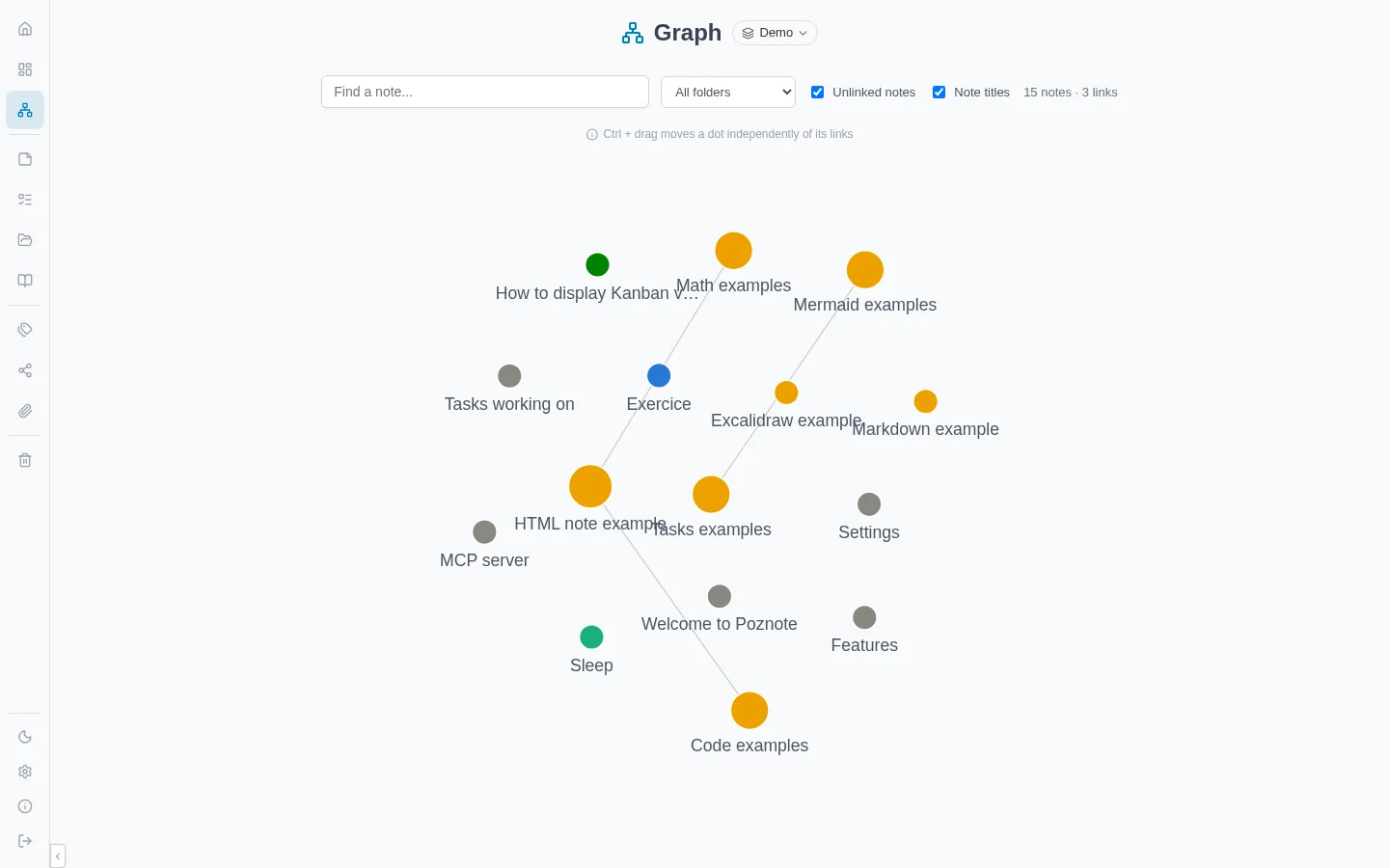
One note per day, filed for you. Read your days as one continuous thread, with an outline of the dates on the right to jump to any day.
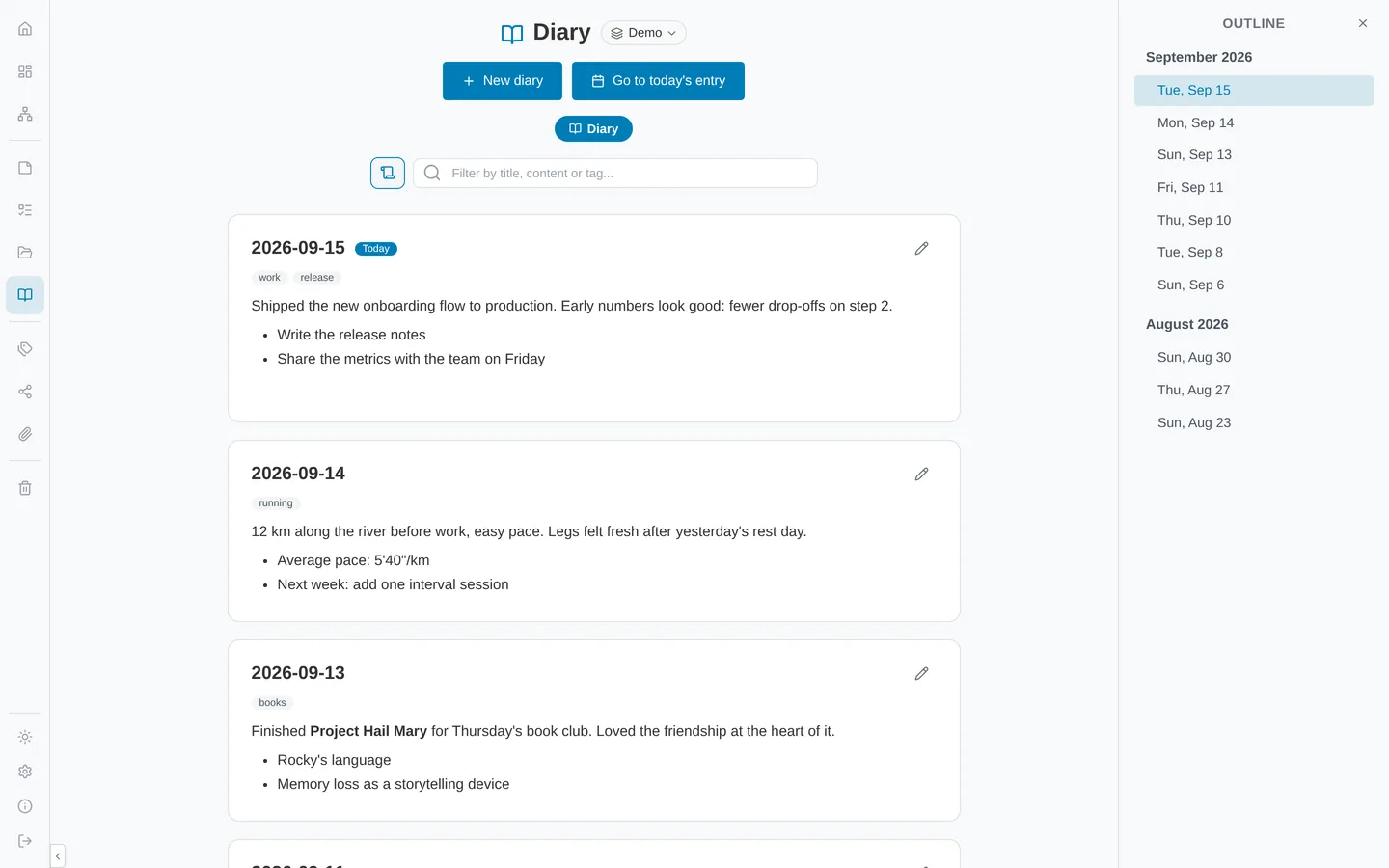
Markdown, code, math, diagrams, graph view and more: see all the screenshots
Everything you need for your notes
Forty-two features built into a single lightweight app. No plugins to install, no add-ons to pay for.
Write the way you like.
Rich text notes for formatting and embeds, Markdown notes with a live preview, and the same folders, tags and search for both.
- Rich text with images, colors, embedded videos and attachments
- Markdown with Mermaid diagrams and KaTeX math
- Code blocks with syntax highlighting for 100+ languages
- Excalidraw drawings edited in place
- Tabs and an outline panel for long notes
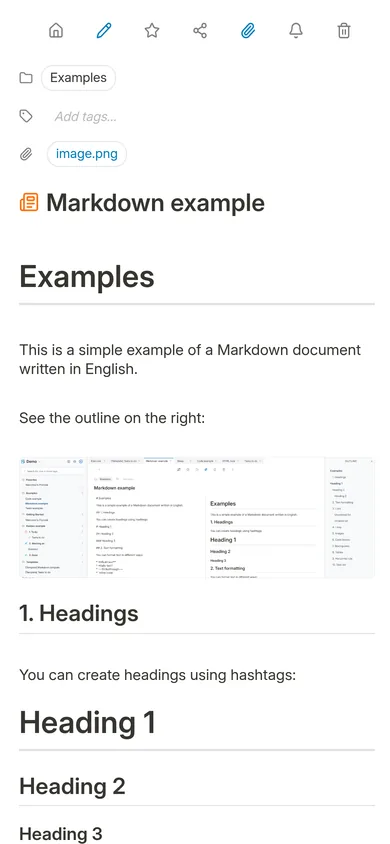
Every to-do, in one place.
Add checklists to any note and follow all of them from a single Tasks page, with a progress bar per list.
- Due dates with an optional time and a reminder
- Important flag, overdue and completed filters
- Monthly calendar view of everything with a due date
- Share a list publicly: collaborators tick items without an account
Folders, tags, boards.
Workspaces and folders for structure, tags for topics that cut across them, and a Kanban board whenever you need one.
- Workspaces to keep work and personal notes apart
- Kanban view on any folder
- Tags page, favorites, pins and shortcuts
- Full-text search across titles, content and tags
- Graph view of the links between notes
Files you can read without Poznote.
Notes are plain .html and .md files on your disk, next to a SQLite database. Nothing is locked in a proprietary format.
- Built-in backup and restore, offline export readable in any browser
- Git synchronization to your own repository
- S3-compatible storage for attachments and scheduled backups
- Daily snapshots and a trash to undo mistakes
- REST API, MCP server and webhooks
Rich Text Editor
Enjoy a powerful, distraction-free environment for writing. Our editor supports advanced formatting, media embedding, and real-time auto-saving to ensure your thoughts are never lost.
Markdown Notes
The best of both worlds. Write in plain text using Markdown for portability and speed, while enjoying a rendered preview of your formatted content.
Syntax Highlighting
Perfect for developers. Write and read code blocks with beautiful syntax highlighting for over 100 languages, making technical documentation a breeze.
Math Rendering
Perfect for students and researchers. Render complex LaTeX math equations beautifully within your notes for academic and scientific documentation.
Mermaid Diagrams
Generate professional charts from simple text. Create flowcharts, sequence diagrams, and Gantt charts using the powerful Mermaid.js syntax.
Excalidraw Integration
Visualize your ideas directly in your notes. Sketch diagrams, mind maps, and wireframes with the built-in Excalidraw whiteboarding tool.
File Attachments
Store all related information in one place. Attach images, PDFs, and documents directly to your notes, keeping your documentation complete and centralized.
Tabs
Work on several notes at once. Open your notes in tabs and switch between them instantly, just like in your favorite browser or code editor.
Tasklist
Turn your notes into action items. Create interactive checklists and task lists to track your progress and stay organized within your documentation.
Reminders
Never miss a deadline. Set notifications for your notes and tasks, and receive alerts to keep your projects on track.
Calendar View
Visualize your notes over time. Browse your notes, tasks, and reminders in a calendar layout to plan your work and never lose track of important dates.
Diary
One note per day, journal-style. The Diary board opens today's entry, creating it if needed, titled with the date and filed automatically in a year and month folder.
Kanban View
Visualize your projects. Transform your folders into dynamic Kanban boards to manage workflows, track progress, and organize your tasks visually.
Tag System
Organize your knowledge with flexible tags. Group notes by project, topic, or status and navigate through your collections with ease using our intuitive sidebar.
Workspaces
Create logical divisions within your library. Organize folders and notes into separate workspaces to keep your work life and personal life perfectly separated.
Powerful Search
Find any note in milliseconds. Our fast, full-text search indexes everything, including your tags and headers, making sure you always find what you're looking for.
Graph View
See how your ideas connect. Explore your entire knowledge base as an interactive graph, revealing links between your notes and discovering unexpected relationships.
Public Sharing
Publish your notes with a single click. Generate secret URLs to share specific pages or documentation folders with others without giving full system access.
Snapshots
Travel back in time. Poznote automatically creates a snapshot once a day when you open a note, allowing you to view and restore previous versions of your work effortlessly.
Trash System
Deleted by mistake? No problem. Our trash system keeps your deleted notes safe for recovery, giving you peace of mind while cleaning up your library.
Built-in Backup
Take control of your data security. Poznote provides built-in tools to easily trigger backups of your entire knowledge base, ensuring you can restore your data whenever needed.
Offline Export
Keep full ownership of your data even without Poznote. Export your entire library into a portable format that can be viewed locally in any browser.
S3 Attachment Storage
Scale your storage. Store note attachments in any S3-compatible object storage instead of the local filesystem, keeping your instance light and your files safe.
S3 Backups
Keep your notes safe off-site. Back up your entire Poznote data to any S3-compatible object storage, so you can restore everything even if your server or device fails.
Git Synchronization
Back up and version your notes like code. Each user can sync their library with their own GitHub or Forgejo repository, with automatic pull on login and push on every change.
Self-Hosted
Your data stays where it belongs: on your servers. Host Poznote via Docker on your NAS, Raspberry Pi, or private VPS for complete privacy and control.
Multi-user
Give everyone their own space on a single instance. Each user has isolated notes, workspaces, and settings, administrators manage the accounts, and notes, folders, or workspaces can be shared read-only with other users. Accounts can also be shared with write access, so several people can work on the same notes.
OpenID Connect
Enterprise-grade security made simple. Connect Poznote to your existing identity provider like Keycloak, Authelia, or Google for secure SSO authentication.
Two-Factor Authentication
Add a second lock to your account. After the password, Poznote asks for a 6-digit code from your authenticator app (Aegis, Google Authenticator, Bitwarden...), and single-use recovery codes cover a lost phone.
Multi-instance
Manage separate databases for different projects or clients. Switch between different note stores effortlessly while maintaining strict data isolation.
Rootless Image
Security by design. Poznote's Docker image can run without root privileges, reducing the attack surface and following container security best practices.
Brute Force Protection
Keep intruders out. Poznote automatically detects and blocks repeated failed login attempts, protecting your instance from password-guessing attacks.
REST API
Extend Poznote's functionality. Use our well-documented API to automate tasks, sync data with other tools, or build your own custom integrations.
MCP Server
Poznote features a built-in Model Context Protocol server. Grant AI models direct, secure access to your knowledge base for advanced context-aware assistance.
AI Assistant
An integrated AI chat that searches and reads your notes on its own to answer your questions, summarize across notes, and even create or rewrite a note when you ask. You bring your own AI: Poznote does not provide the model, you connect it with your own API key (OpenAI, Anthropic Claude, etc.).
Webhooks
Connect Poznote to your other tools. Trigger HTTP notifications to external services whenever your notes change, making it easy to build automations and integrations.
Browser Extension
Save the current page to Poznote in one click. The Chrome extension sends the URL or a full-page screenshot to your instance, and on Android the installed app appears in the system Share menu.
Responsive Design
Take your notes everywhere. Poznote's interface adapts perfectly to any screen size, providing a seamless experience from your desktop to your smartphone.
Progressive Web App
Install Poznote directly on your device. Enjoy an app-like experience with quick access from your home screen and faster loading times as a standalone web application.
Offline Notes
Keep writing on a train or anywhere without Wi-Fi. Your recent notes, your favorites and whatever you choose to keep offline stay in your browser, and your changes are sent back as soon as you are online again.
Themes
Pick the look you like: Light, Dark, Black, Lavender, Sepia or Terminal, one click away in the sidebar. Until you choose, Poznote follows your system's light or dark setting, and administrators can add their own CSS themes.
Languages
A truly global tool. Poznote is available in multiple languages with full support for international characters and localized interfaces.
Poznote is a notes app, not a whole office suite: no email, no spreadsheets, no video calls. What you already run can stay. OpenID Connect plugs into your identity provider, S3 into your object storage, Git into your forge, and the REST API, MCP server and webhooks let the rest of your setup talk to it.
Several apps, one place.
The tools people usually stack up for notes, tasks and diagrams, and the one self-hosted app that covers them.
Notes & workspaces - Rich text, folders, tags, public sharing
Markdown & graph view - Plain .md files, links between notes, an interactive graph
Rich text editor - Formatting, images, attachments, full-text search
Task lists - Due dates, reminders, a Tasks page and a calendar view
Kanban view - Folders as boards, notes as cards
Excalidraw - Hand-drawn diagrams right inside your notes
Mermaid & KaTeX - Flowcharts, Gantt charts and math from plain text
Diary - One note per day, filed automatically by month
AI assistant - Reads your notes, with the model of your choice (you'll need an API key)
One app, on your server. Free, open source, yours.
The questions worth asking first
What if Poznote stops being developed?
Can I take my notes somewhere else?
Who can read my notes?
Does it need a powerful computer?
I don't want to manage a server. Can I still use it?
Install it yourself, or don't.
Two ways to get Poznote, and it is the same app either way. Comfortable with Docker? Install it yourself in a few commands. Rather not deal with a server? A hosting company runs it for you.
I'll install it myself
On a server, a NAS, a Raspberry Pi, or your own computer with Docker Desktop, WSL or a virtual machine: pull the official images and start them. It also works very well for an installation cut off from the internet.
- Your notes stay on hardware you own
- Two Docker containers and a SQLite database, nothing else
- You decide when to install updates
- Free and MIT licensed, no limits, no subscription
I don't want to manage a server
A hosting company runs Poznote on its own computers and keeps it online. You open a web address, sign in, and start writing. Same Poznote, your notes stay yours.
- No technical knowledge required
- Nothing to install on your computer or phone
- Ready in a few minutes, works from any browser
- From $2 a month, cancel any time and take your notes with you
Rather not deal with any of it?
We can also install and configure Poznote for you, free of charge, with a host of your choice. You just create the hosting account, and we take care of the rest: login, secure address, backups.
Thank you, supporters.
Poznote is free and has no company behind it. The people below chipped in on Ko-fi to keep it going, and some of them left a word.
I've already tested all sorts of notes apps, I looked at this one for a minute and knew straight away, this app is brilliant!
Thank you for the best note taking app available. Your dedication and willingness to listen to the community is outstanding. That in itself makes it worthwhile to use Poznote. Thank you for all your hard work and time to make Poznote better with every release.
You can tell that someone is working on this program with joy and enthusiasm. Meaningful suggestions are implemented with admirable speed, and I'm happy to support that with my contribution.
I love this app! Finally, a full featured open source app that doesn't lock features behind a pay wall! Thank you very much for your work on this!
Thanks for Poznote! I use it on daily basis to capture all my notes and activities. The MCP server is great to use Poznote as a Second Brain. Merci !
Thanks for Poznote! It's been great and is helping me to finally stick with taking proper notes.
Great idea, great reactivity, great work!
GREAT!
It is optional, and it helps Poznote stay free and independent.
They talk about Poznote
Media coverage, reviews and community feedback.
I finally found a self-hosted notes app that doesn't feel like work
Poznote shows a lot of promise as an open-source, self-hosted note-taking app that can serve as an alternative to Google Keep and Google Docs. I am impressed by the tool, and I'm excited to see where it goes next.
xda-developers.comPoznote - La meilleure app de notes auto-hébergeable !
Vous cherchez une app de prise de notes que vous pouvez héberger vous-même, sans dépendre d'un cloud propriétaire ? Poznote est une application web légère où vous gardez la main sur vos données.
korben.infoMy Favorite Self-Hosted Apps Launched in 2025
Poznote is a lightweight, open-source note-taking approach while still looking modern and clean. Its feature-set makes it a more-than-adequate documentation tool.
selfh.stPoznote looks like Obsidian, but accessed through your browser
Poznote offers nearly all the functionality of Obsidian, with one outstanding perk: it runs entirely in your browser. No awkward syncing methods required.
xda-developers.comPoznote - Prise de notes auto-hébergée et documentation légère
Poznote s'impose comme une solution open-source pour reprendre le contrôle sur ses données, sans dépendre d'un cloud propriétaire. Une alternative moderne à Notion ou Obsidian, accessible depuis n'importe quel navigateur.
extrag.oneFrom self-hosting notes
I recently wanted to move away from Apple's Notes app. After checking several options, the winner is Poznote! It can work with markdown as well as HTML, and the developer is very responsive.
kittsteiner.blogHow to Install Poznote on Your Synology NAS
Poznote is a lightweight, open-source, self-hosted note-taking app that runs entirely in your browser. It combines Markdown simplicity with powerful visual tools.
mariushosting.comInstaller Poznote avec Docker
Sous les conseils de Titux, j'ai testé Poznote. Une application pour créer des notes, des listes, organiser le tout sous forme de dossier. Sa consommation en ressources est faible.
belginux.comOS Apps: Poznote and Joplin
Exploring self-hosted note taking suites. Poznote is a lightweight, open-source personal note-taking and documentation platform with built-in MCP server support.
linkedin.comOS Apps: Poznote and Joplin
Poznote is a personal note-taking and documentation platform. It has some key features that other solutions lack: namely a built-in MCP server and easy to setup MFA.
freshbrewed.scienceSelf-Host Weekly (5 December 2025)
Meet Poznote, a lightweight web app for note-taking. Jot down thoughts, ideas, and documentation from a modern, minimal web interface. Easily deployed via Docker.
selfh.stTake back control of your notes.
Install it once and it is yours after that. No account with us, no subscription, and nothing of ours between you and your files.